
Treat the server environment as business infrastructure
A server setup is not simply a machine placed on a shelf. It is a chain of dependencies that includes internet service, firewall policy, switching, cabling, identity, storage, power, cooling, backups, monitoring, and the physical room. The business experiences the result as application speed, file access, phone quality, reliable printing, secure remote work, and the ability to recover after a failure. Planning the whole chain prevents a strong server from being undermined by weak infrastructure.
Begin with business impact. List the services staff use, who uses them, acceptable downtime, and the consequence of losing a day or week of data. Distinguish systems that must remain local from those suited to cloud or hosted platforms. Many organizations benefit from a hybrid design: local switching, security, printing, and perhaps file or application services combined with cloud identity, collaboration, and off-site backup. The right answer follows operational needs rather than a blanket preference for on-premises or cloud.
Inventory workloads, users, and growth
Document current applications, databases, storage consumption, virtual machines, cameras, phones, wireless clients, remote users, and integrations. Measure rather than guess where possible. CPU peaks, memory demand, disk latency, network throughput, and backup windows expose different bottlenecks. Include seasonal peaks and planned hiring. A design for the average day can fail during month-end processing, busy retail periods, large file transfers, or simultaneous video meetings.
Growth assumptions should be explicit. Decide whether the next three to five years will add users, locations, cameras, data retention, analytics, or specialized applications. Some capacity belongs in the initial design: rack units, power, cooling, switch ports, fiber uplinks, address space, and storage expansion. Other capacity is better added later because technology and licensing change. The goal is a platform that can expand without buying equipment that will be obsolete before it is used.

Choose and prepare the physical environment
Select a secure, dry, clean, and conditioned space with controlled access. Avoid plumbing, janitorial storage, direct exterior exposure, and rooms that regularly exceed equipment temperature or humidity limits. Provide enough rack depth, front and rear clearance, wall backing where needed, and pathways for incoming services and horizontal cabling. Consider sound if the rack shares occupied space; fans and UPS units can be disruptive.
Power design should identify dedicated circuits, receptacle type, UPS capacity, surge protection, and generator availability. Size runtime according to the recovery plan, not a generic number. A short UPS window may only need to bridge generator start or allow graceful shutdown. Longer continuity requires greater battery capacity and attention to cooling during utility failure. Monitor UPS health and replace batteries on schedule. Label every power source so technicians know what can be safely disconnected.
Use a clean rack and cabling standard
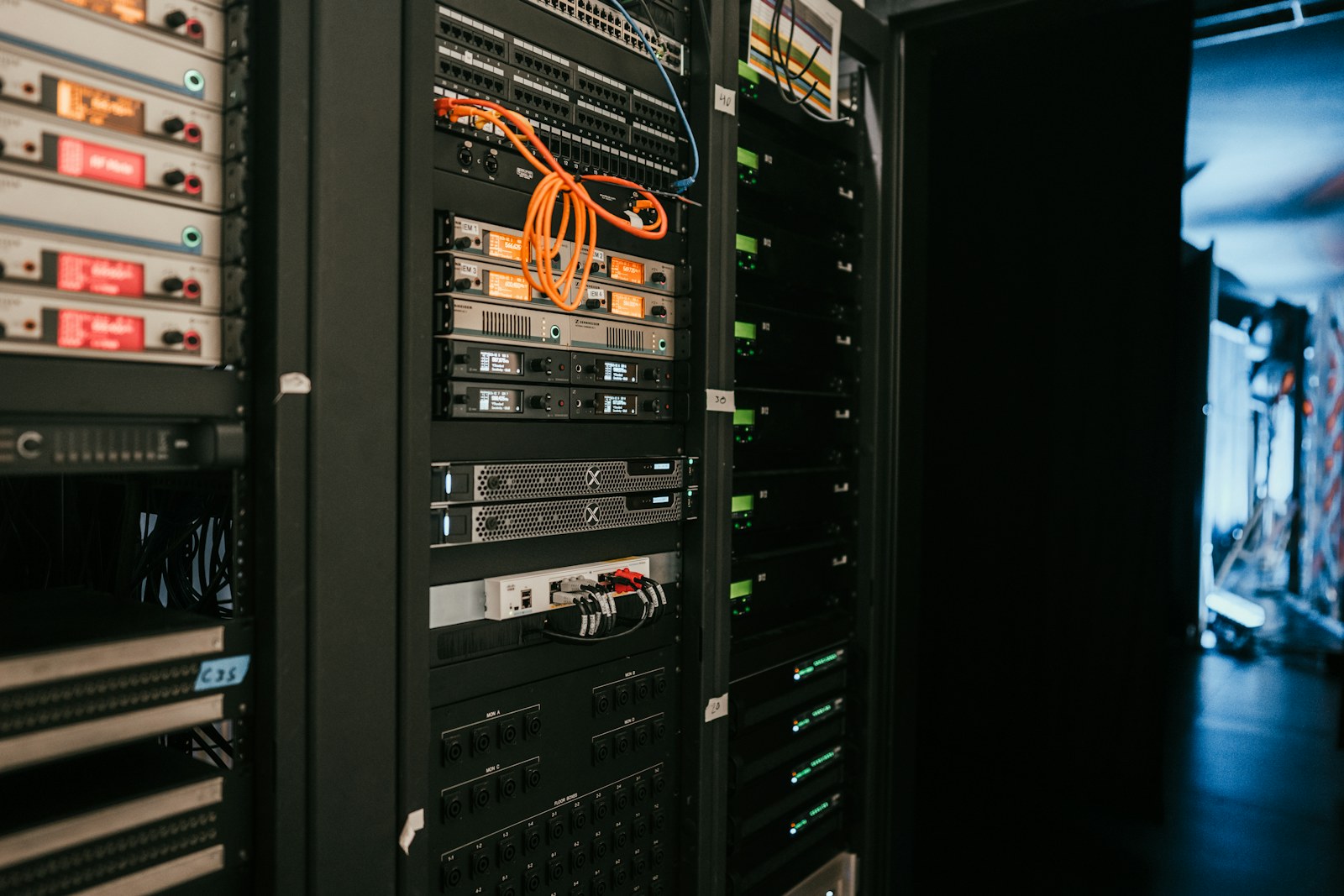
A serviceable rack has a logical layout: fiber and copper termination, cable management, switching, security appliances, servers, storage, and power equipment arranged with airflow and access in mind. Short, color-coded patch cords can communicate function when the scheme is documented. Velcro supports changes without crushing cable bundles. Service loops should be controlled, and patching should not block fans or equipment removal. Blank panels and brush panels can improve airflow and cable entry.
Permanent cabling should be certified and labeled from the work-area outlet to the patch-panel port. Maintain separation from power and respect bend radius. Use fiber for building backbones, electrically noisy paths, long distances, and connections between structures where copper can create surge and grounding risk. Record test results. When a network problem appears months later, verified cabling and accurate labels make troubleshooting dramatically faster.
Segment the network and protect the edge
A flat network gives every device unnecessary proximity to every other device. Use VLANs and firewall rules to separate business systems, servers, voice, cameras, building controls, guest Wi-Fi, management interfaces, and untrusted devices. Segmentation is not security by itself, but it limits the paths an attacker or compromised device can use. Keep the rule set understandable: permit required communication, deny unnecessary access, and document exceptions.
At the edge, use a supported firewall with current security services when appropriate, multi-factor authentication for administration, and encrypted remote access. Avoid exposing server-management pages, recorders, or remote desktop services directly to the internet. Disable default accounts, change default credentials, and restrict management to designated networks. Configure DNS filtering, intrusion prevention, and geo or reputation controls based on the organization’s risk and support capacity, then monitor alerts so security features are more than checkboxes.

Build identity, updates, and least privilege into operations
Central identity makes onboarding, role changes, and departures consistent. Users should have individual accounts, strong authentication, and access based on job responsibilities. Administrators should use separate privileged accounts rather than performing daily email and web browsing with elevated rights. Service accounts need defined owners, limited permissions, protected credentials, and review dates. Shared passwords make accountability and clean offboarding nearly impossible.
Patch management should cover operating systems, hypervisors, applications, firmware, firewalls, switches, access points, storage, and UPS network cards. Define maintenance windows and a method for testing important updates. Unsupported equipment belongs on a replacement plan, even when it still powers on. Inventory tools and monitoring can flag version drift, failed disks, capacity thresholds, certificate expiration, and backup errors before users discover them through an outage.
Design backups for recovery, not just completion
A green backup status does not prove that the business can recover. Define recovery point objectives—how much data can be lost—and recovery time objectives—how long restoration can take—for each important system. Use multiple copies on different media, with at least one copy isolated from routine administrative credentials and one copy off site. Immutable or otherwise protected backups reduce the risk that ransomware encrypts the recovery path along with production data.
Test restores on a schedule. File-level recovery, database recovery, virtual-machine recovery, and full environment recovery are different exercises. Record the steps, required credentials, dependencies, and estimated times. Include configuration backups for firewalls, switches, access points, camera systems, and other infrastructure. A recovery plan should name who makes decisions, who communicates, where replacement hardware comes from, and how the business operates while systems are limited.
Commission, document, and hand off
Before launch, test internet failover if present, UPS behavior, server restart order, permissions, wireless roaming, voice quality, remote access, alerts, backup jobs, and representative restores. Confirm time synchronization and reliable DNS because many authentication and certificate problems begin there. Review logs for errors that are easy to fix before production load. Scan from inside and outside the network to verify that intended services are available and unintended services are not.
The handoff should include an accurate network diagram, rack elevation, port map, IP and VLAN plan, asset inventory, warranty dates, support contacts, backup design, recovery procedure, and credential-transfer process. Keep secrets in a proper password manager, not in the diagram. Train the internal owner on routine checks and escalation. A well-built server environment is calm: labeled, monitored, backed up, and understandable. Core Lynk Systems can coordinate the physical layer, rack, network, cameras, access systems, and documentation so growing businesses have one coherent foundation.
Have a project in mind?
We help commercial and residential clients turn requirements into clean, serviceable systems.
Request a consultation ↗